Some times reaching all employees of the company at once for important messages is not possible and/or inconvenient. However, if it is necessary to convey certain information to the employees, it possible to achieve that through Voice Messaging in ASR. ASR user can type a message, set recipients of the message (one or many employees) and send the message to the employees' ASR telephony messages Voice Mail. The next time employee calls in through the ASR's telephony facility, the message will be played back to the employee using the computer-generated voice of the message's text. The Employee will not be able to make any check-in/outs until all new Voice Messages for the employee are listened by the employee. For more information on ASR telephony please refer to Listening to Voice Messages section.
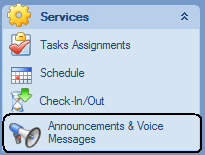
To open the Announcements and Voice Messages screen select "Announcements and Voice Messages" from the ASR's Explorer Bar:
The Announcements and Voice Messages screen:

To create new message:
Create a new message in the Voice Messages grid. Note that Message ID and Message Date/Time fields are filled in automatically. Type in the Message Text.
Once the message is created, highlight the message in the grid and defined message recipients in the "Recipients" grid in the right-hand portion of the screen.
Once the message has been listened to by its recipients, the "Listened On" column of the recipients grid will indicate the date and time when the message was played back to the employee.