ASR Main Window Overview
The Main ASR Window consists of four main areas:
The Explorer Bar, the Tool Bar, the Screen Area and the Notifications Area:
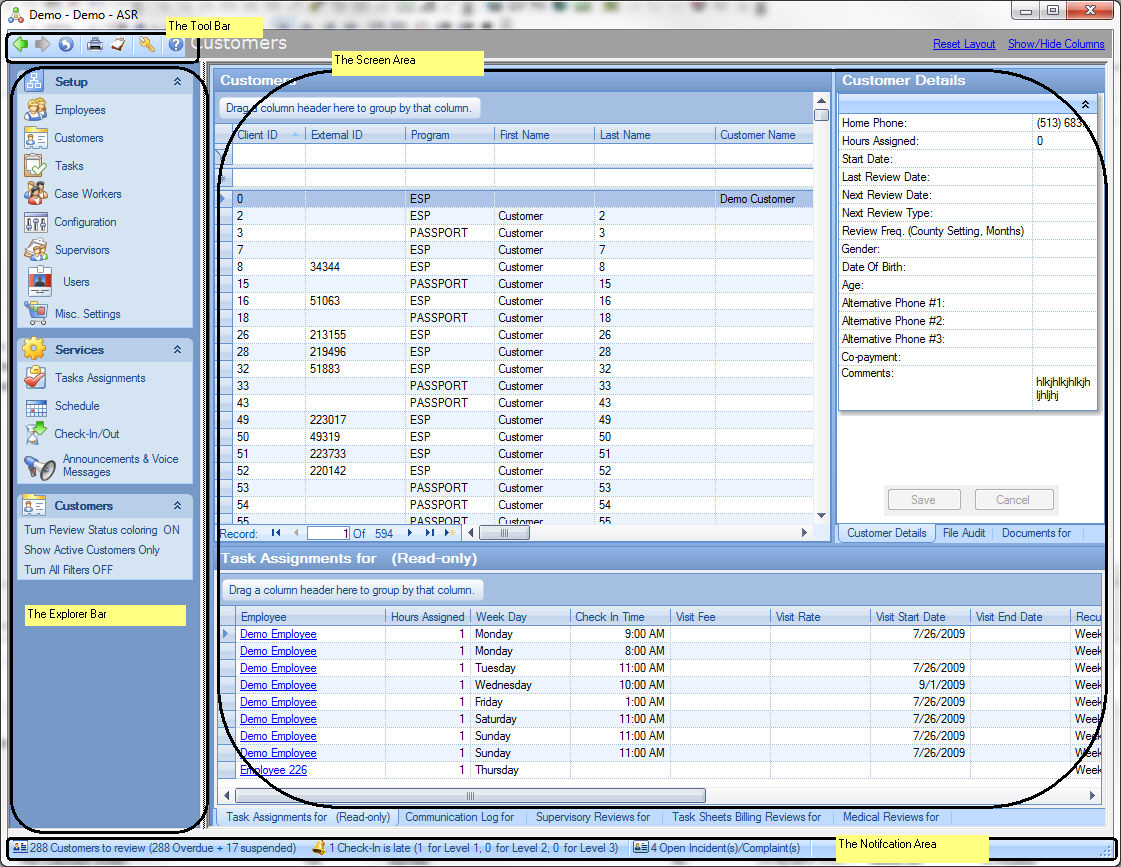
The Tool Bar:
- Navigate Between the screens already opened previously using the buttons
 and
and  . These buttons work like "Back" and "Forward" buttons of a web browser, except that the user navigates between ASR screens.
- Reload content of the currently selected Screen using the button
 .
.
- Print contents of the current Screen (where supported) using the button
 .
.
- Generate a Report in the context of the current Screen using the button
 . Please refer to the Reporting Section of this help for more details.
- Logout from ASR using the button
 .
.
The Explorer Bar is the main navigation area of ASR that allows users to open Screens.
The Explorer Bar consists of two primary sections: Setup and Services.
The Setup section contains the following screens:
- Employees: maintenance of company's employees. More details are described in The Employees Screen section of this help.
- Customers: maintenance of company's customers.. More details are described in The Customers Screen section of this help.
- Tasks: maintenance of all tasks that company's employees may be performing while visiting clients. More details are described in Defining Visit Tasks in ASR section of this help.
- Case Workers: maintenance of case workers associated with the clients.
- Configuration: configuration settings in ASR. More details are described in the ASR Miscellaneous Settings section of this help.
- Supervisors: maintenance of company's supervisors.
- Users (available to administrative users only): maintenance of ASR users. More details are described in the Managing ASR Users section of this help.
- Miscellaneous Settings: maintenance of various settings and setup data in ASR. More details are described in the ASR Miscellaneous Settings section of this help.
The Services section contains the following screens:
The Explorer bar may contain screen-specific section based on currently active screen.
The Screen Area displays the contents of the currently selected screen.
The Notification Area:
There are several notifications that can be optionally displayed as blinking icons by ASR:
- Customer Reviews Due (with details).
- Employees Reviews Due.
- Customer File Audit Reviews Due.
- Late check-ins.
- Open Incidents.
- Unresolved File Audit findings.
- Employees birthdays approaching.
Please refer to The Notification Bar section of this help for more information
Users can turn on and off each notification in the Configuration Screen.